
Frequently Asked Questions
Answers to the questions candidates ask most often, grouped by stage of the examination process. Select a question to display the answer.
Online Exams
Can I take my ham radio license exam online?
Yes. PARC gives the Technician, General and Amateur Extra exams online nearly every day, supervised over Zoom by a team of at least three Volunteer Examiners. Candidates test from home on a Windows or Mac computer, with a phone or tablet as a second camera.
Is an online exam as valid as an in-person exam?
Yes. The online exam uses the same FCC question pools and pass marks as an in-person exam, is graded by accredited Volunteer Examiners, and results in the same license. PARC administers examinations for the ARRL VEC under FCC rules.
How much does an online ham radio exam cost?
The examination fee is $15, paid when booking and forwarded to the ARRL VEC. A new license also requires the FCC’s $35 application fee, paid directly to the FCC after the examination. Upgrades have no FCC fee.
Booking and Scheduling
How do I schedule an exam?
- Online exams: select a time on the schedule. Candidates must read the online testing overview before booking.
- In-person exams: request an appointment by email, as described on the In-Person Testing page.
When will I receive the registration and Zoom links?
Two emails are sent, both from vetesting@yahoo.com. The registration link is sent within 48 hours of booking; registrations are processed once a day, so candidates who book for the following day should continue to monitor their email. The registration must be completed as soon as it arrives: it is the license application (FCC Form 605), it requires the candidate’s FRN, and admission to the examination depends on it. The Zoom link is sent at least 45 minutes before the examination, and candidates join on both devices 45 minutes early. Check spam and junk folders for both emails.
Can I take more than one exam in a session?
- Online exams: only when arranged by email before booking. Approval depends on practice test scores, the time required for each element, and the availability of consecutive time slots on the requested day.
- In-person exams: yes, provided that the first examination is completed within a reasonable time or additional examinations are requested from the exam team in advance.
My session time has passed and I am still in the waiting room. What should I do?
Remain in the waiting room. A candidate in the waiting room has received a link and is on the schedule. Sessions can run late when earlier candidates require more time, and the exam team admits each candidate as soon as possible. Monitor the Zoom chat for messages. Each device must display the candidate’s name followed by “computer” or “phone”; a device the team cannot identify is not admitted until all other candidates have been tested, if at all.
No available time suits my schedule. What should I do?
New times are added regularly; check the schedule again over the following days. If no suitable time becomes available, email vetesting@yahoo.com with the dates on which you are available and whether morning, afternoon or evening is preferred.
How long does the exam take, and is there a time limit?
- Online exams: there is no strict time limit, although examination duration is recorded. Most prepared candidates finish in approximately 10 minutes; allow 15 minutes for the examination itself. If a candidate has missed more than 25% of the questions and the time taken indicates a lack of preparation, the exam team may end the examination.
- In-person exams: yes. Most exam teams remain at a session for up to one hour. Additional time must be requested from the exam team in advance. Because the examiners are volunteers, sufficient examiners may not be available beyond one hour; this varies by session.
What happens if I miss my exam time slot?
Candidates who need to reschedule must email PARC as soon as possible, so that the time slot can be offered to another candidate. A candidate who does not attend, or who does not give at least 24 hours’ notice, is recorded as a no-show.
Payment
What payment methods are accepted?
- Online exams: the $15 fee is paid by credit or debit card when booking a time slot on the schedule. There is no separate payment step. The same email address must be used for booking, payment and registration, or the session may not be matched to the payment.
- In-person exams: payment is made in cash at the session. PayPal is used only for donations, never for examination fees.
I paid for my exam but received a non-payment notice. What should I do?
Either the card payment was not completed, or the name and email address on the payment do not match those on the examination registration. Request an invoice by email; it will be sent with your name in the subject line.
What are donations used for?
Donations are never required and are unrelated to booking an examination. They fund equipment, radio classes, internet service, subscriptions, power and training, including the infrastructure for online examinations. Neither club receives funding from a school or other organization; all funding comes from members and the wider amateur radio community.
Identification and Registration
Does PARC give online exams to candidates who are not US citizens?
Yes. Citizenship is not required, but a physical, unexpired US photo ID is: a state-issued driver’s license or photo ID card showing the candidate’s current residential address, or a US passport. Passports issued by other countries are not accepted for online examinations. Requirements for candidates under 18 are listed under Acceptable Identification. Do not book without acceptable identification: the examination cannot proceed without it, and the fee is not refunded.
Is an FRN required?
Yes. An FCC Registration Number (FRN) is required for all examinations. The FRN is issued by the FCC and requires identity verification. A Restricted Use FRN cannot be used.
An FRN beginning with the digits 213 (among others) is a Restricted Use FRN, which cannot be used for an application in the Amateur Radio Service. A Restricted Use FRN may be used only on FCC Form 2100, Schedule 323-E (Ownership Report for Noncommercial Broadcast Stations).
If an applicant attempts to use a Restricted Use FRN, the session is terminated and the examination is canceled for failure to provide a valid FRN. The applicant must obtain a standard FRN before scheduling another examination and applying for an amateur radio license.
Do I need my PIN for the exam?
No. The exam team requires only the candidate’s photo identification. The Exam Manager provides the code used to open the examination.
How many forms of identification are required?
Adult candidates require one: a physical state-issued driver’s license, state-issued photo ID card or US passport. Different requirements apply to candidates under 18.
Equipment and Setup
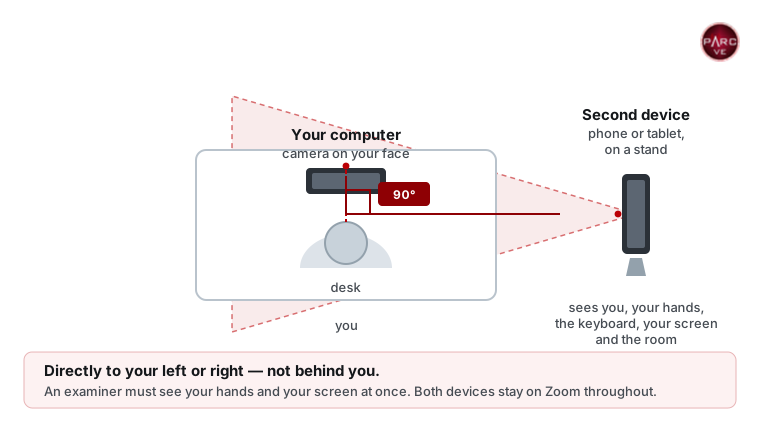
Are two devices with cameras required for an online exam?
Yes. Two separate devices with working cameras, each with the Zoom application installed and running, are required for the entire session.
Device requirements:
- Primary device (desktop or laptop computer)
- Must have a working camera.
- Must be positioned so that the camera provides a clear, unobstructed view of the candidate’s face from the computer screen.
- Is used for the Zoom meeting and the examination.
- Secondary device (phone, tablet or second computer)
- Requires its own working camera.
- Must be positioned at 90 degrees to the candidate’s left or right.
- The camera must provide a clear, continuous view of the entire workspace, including the candidate’s face, hands, keyboard, computer screen and surrounding area for the full duration of the examination.
- Both devices must remain connected to Zoom for the entire examination.
- The exam team has sole discretion to determine whether the camera setup meets these requirements.
- A candidate who does not meet these requirements will not be permitted to test and must attend an in-person session instead.
Important: failure to set up the devices correctly or to follow any examination instruction results in forfeiture of the examination fee, without refund. There are no exceptions to the two-device requirement.
Can an iPad, tablet or Chromebook be used as the exam computer?
- Online exams: no. The candidate’s face must remain visible on camera throughout the examination, and these devices typically turn off the camera when sharing the screen. A laptop or desktop computer with a camera centered on the candidate’s face is required, together with the second camera device to one side.
- In-person exams: a device may be permitted if the exam team can confirm that it has no assistive software installed. This is at the discretion of the exam team.
How are the devices renamed in Zoom?
A device cannot be renamed in the waiting room; each device is named when joining. Sign out of the Zoom application on both devices first, because a signed-in device uses the account name and does not request a name. Then open the Zoom link from the email on each device and, when prompted, enter your first and last name followed by “computer” or “phone”, for example “Jane Doe computer”. The Zoom application is required; Zoom in a web browser is not supported.
Must the Zoom application be downloaded?
Yes. The Zoom application must be installed and running on both devices. Zoom cannot be run from a web browser for the examination.
Can a mouse or external keyboard be used?
No. External mice and keyboards are not permitted on a laptop and are not required. Answers are selected with the A, B, C and D keys, which also advance the examination to the next question. Questions are aligned to the bottom of the window so that any diagrams above them remain visible. Minor adjustments during setup can be made with the trackpad; on a desktop computer, the mouse may be used during setup.
How are Zoom settings tested?
Install the Zoom application, then test video and audio using Zoom’s testing procedures. After confirming that audio and video work correctly, test the equipment in a Zoom test meeting.
Which applications may be running on the computer?
To protect the integrity of the examination, all non-essential applications must be closed. These include, but are not limited to, mail, messaging, alerts, Teams, TeamViewer, Discord, Steam, VNC, remote desktop tools and VPNs. The exam team checks the computer for these applications. Running applications are shown by dots (Mac) or lines (Windows) beneath their icons in the Dock or taskbar. On Windows, also check the hidden icons area (^) of the taskbar. Quit everything not required to operate the computer. Follow the exam team’s instructions during setup. During the examination, only Zoom and the examination, in a single browser tab, may be open. Use the calculator built into ExamTools rather than a calculator application.
Must wearable technology be removed?
Yes. Headsets, earbuds, headphones, smart watches and smart glasses must be removed before joining Zoom and placed out of reach. Hats, wristbands and any item that could obscure the face or conceal an aid, such as a bandana or scarf, may not be worn.
Can a multi-monitor setup be used?
Only one monitor may be in operation in the room. A laptop may not be connected to a docking station. Remove, turn away or cover all additional screens or monitors; a shirt, blanket or towel is sufficient to cover a screen. During the examination, keep your attention on the examination screen.
A bathroom is often a suitable location: it is small, has few electronic distractions, and the door can be locked.
During the Exam
Can I find out which questions I missed?
- Online exams: no. This information is not available to candidates.
- In-person exams: no. Examiners may disclose only the number of questions missed.
Are the exam and the room recorded?
Yes. When joining the meeting, candidates are asked to consent in accordance with recording laws. By consenting, the candidate confirms that any items they do not wish to be recorded during the examination or room scan have been covered or removed. A 360-degree scan of the room is required, together with a view of the work surface. The candidate agrees to the recording, storage and distribution of video, images and audio from the meeting. Recordings are kept for up to 30 days in case of any question about the exam protocol.
PARC does not publish any information about candidates without their permission. Candidates may share their experience by leaving a review.
After the Exam
When is the CSCE issued?
- Online exams: by email within 48 hours.
- In-person exams: at the session, upon successful completion of an examination element.
When will the FCC issue my call sign?
PARC files electronically, so an upgrade, or a new license once the FCC’s $35 fee has been paid, can be granted the same day during FCC business hours. Issuance depends on FCC systems and usually takes up to 5–7 business days; backlogs can extend this. Wait ten business days before contacting PARC or the FCC.
Is a temporary license issued after passing?
No. The CSCE records the elements passed, but a new operator may not transmit until the FCC grants the license and it appears in the FCC database. A new license is granted only after the FCC’s $35 application fee has been paid.
Is any further action required after passing?
Yes, for new licenses. The FCC charges a $35 fee for new amateur radio licenses, as mandated by Congress and in effect since April 19, 2022. After the first examination is passed, the Volunteer Examiner Coordinator submits the candidate’s information to the FCC. When the FCC processes the application, it emails instructions to pay the $35 fee online. The fee must be paid within 10 days or the application is dismissed; check spam folders for this email.
There is currently no fee for address changes or upgrades. All other filings require a $35 fee.
Accessibility and Accommodations
Is a verbal exam available for candidates with special needs?
- Online exams: yes. A Volunteer Examiner designated by the exam team may read each question aloud, up to two times per question.
- In-person exams: yes. A Volunteer Examiner selected by the exam team may read the questions and answers aloud.
May a person I know read the exam to me?
No. This is strictly prohibited. Only Volunteer Examiners and candidates taking an examination may be present during the examination. The sole exception is that one parent may observe from a distance when the candidate is under age 13.
I am unable to use an on-screen calculator. May I use scrap paper or a physical calculator?
- Online exams: no. Scrap paper and calculators other than the calculator built into ExamTools are not permitted. A candidate who cannot use that calculator may ask an examiner to perform the calculation: state the calculation, such as the sine of 60 degrees, and the examiner enters it and reads back the result. Request this before booking.
- In-person exams: candidates may bring a basic calculator with no memory or programmable functions. Calculations are done on the back of the answer sheet.
How are accommodations arranged?
- Online exams: email PARC before booking with a description of the disability and the assistance required. For example, an examiner may read the questions aloud. Other accommodations depend on what can be provided while meeting the online examination requirements; some candidates are better served by an in-person session.
- In-person exams: reasonable accommodations can usually be provided, subject to the limitations of the location and at the sole discretion of the exam team. All examiners are volunteers and are under no obligation to administer an examination they are unable or unwilling to conduct.
Assistance with Costs
Is financial assistance available to candidates age 17 or under?
PARC is an officially recognized testing team for the ARRL VEC. Candidates who test with PARC may be eligible for the ARRL Youth Licensing Grant Program, in effect since April 19, 2022. The program covers the one-time $35 application fee for new license candidates under 18 years of age who test under the ARRL Volunteer Examiner Coordinator (VEC) program.
The program is funded by a special initiative that may be restricted or discontinued at any time. Until any change takes effect, eligible candidates who meet the requirements receive reimbursement. Candidates who did not test with the ARRL VEC, or who are over 17 years of age, are not eligible. After the examination, eligible candidates receive an email with a link to claim the reimbursement.
How is an expired license reinstated?
Within 728 days of expiration, a license can be renewed online through the FCC, or PARC can file the renewal for a fee. After that period, email an official copy of the expired license, or a copy of the official callbook page showing that the license was held before 1984. Then schedule and pass the Technician class examination. Before the examination begins, inform the exam team that the license expired, that proof has been emailed, and that General, Advanced or Amateur Extra class privileges are to be restored. This cannot be processed after the examination without scheduling another examination.
Further Assistance
Common problems and their solutions are listed on the Troubleshooting page.
PARC examiners are volunteers and cannot reply immediately. Email vetesting@yahoo.com and allow up to 24 hours for a reply, excluding holidays.
Wait ten business days before contacting PARC or the FCC about license status. This is the normal processing time, and earlier inquiries do not shorten it.
Retired members also answer questions in the PARC Facebook group.
Troubleshooting Contact by Email PARC Facebook Group (opens in a new tab) New Ham FAQ (PDF)